
Variable data printing in plain English
Most printing produces thousands of identical pieces. Variable data printing produces thousands of pieces that are each slightly different: a different name, a different code, a different address, a different serial number, all in one run. It solves problems that are genuinely awkward otherwise, and it fails in one specific way that is worth understanding before you commit.
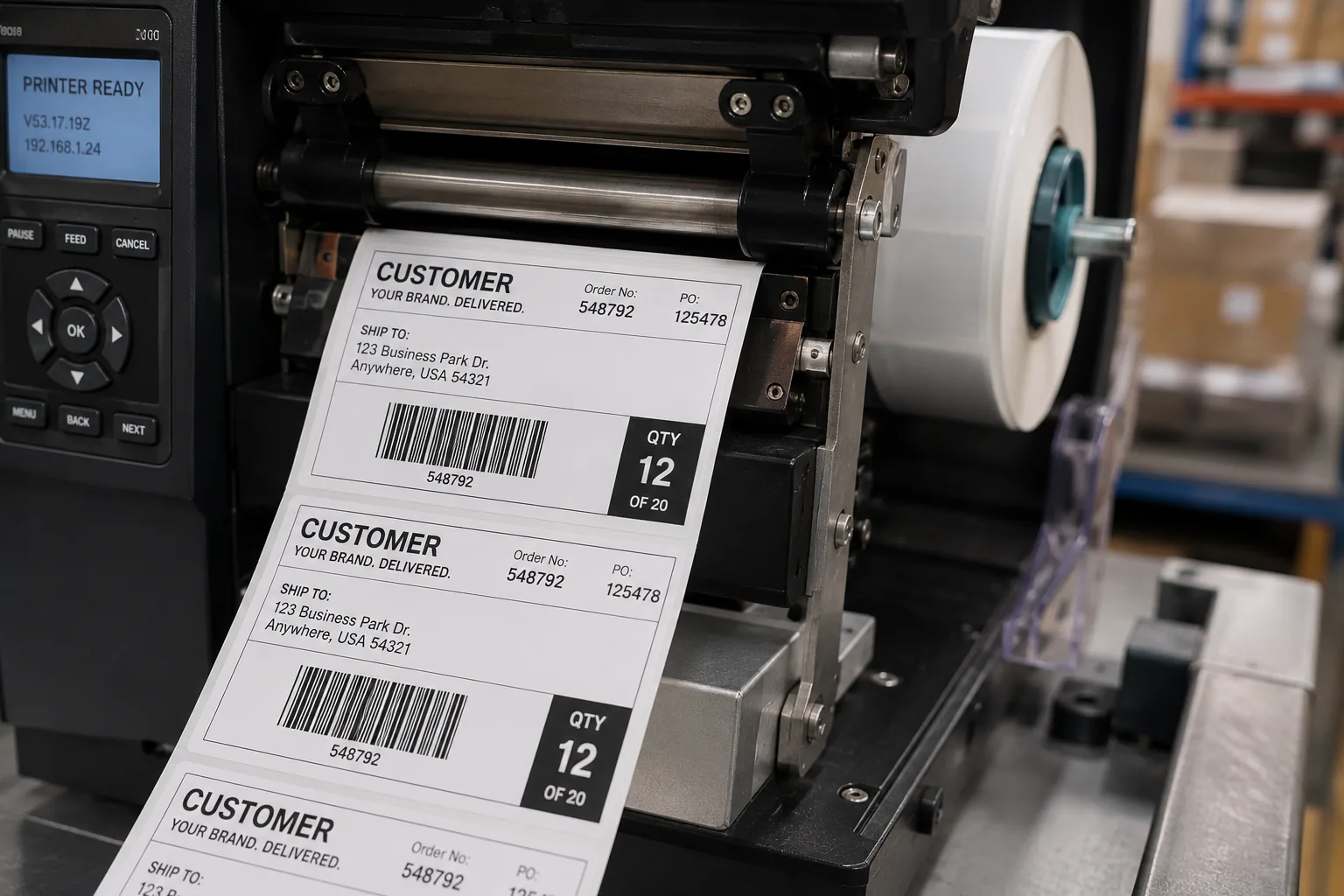
What it actually does
A normal print run images the same content onto every piece. Variable data printing pulls specified fields from a list and changes them piece by piece while the rest of the design stays fixed.
The mental model that helps: your design has holes in it, and a spreadsheet fills the holes, one row per piece. Everything not in a hole is identical across the run. Everything in a hole comes from the list.
What can vary in practice: names, addresses, membership or account numbers, serial numbers, unique codes and coupon codes, QR codes pointing to individual URLs, dates, locations, and short blocks of text.
What it needs from you: a spreadsheet with one row per unique piece, and a clear statement of what changes and where it prints. Those two things are the whole requirement, and the spreadsheet is non-negotiable. Without a list there is nothing to vary from.
Where it genuinely pays
Serialization and unique codes
Anything requiring a unique identifier per unit: asset tags, warranty registration codes, promotional codes redeemable once, ticket numbers, authentication codes. The alternative to variable data here is not a cheaper print method; it is applying stickers by hand, which does not scale and introduces errors.
Personalized direct mail
Addressed mail is variable data by definition, since every piece carries a different address. Beyond the address, personalization can extend to the recipient's name in the body, their local branch, or a code tied to their record.
Versioned material without versioned runs
This is the underappreciated case. Suppose you need the same brochure for twelve regional offices, each with its own address and phone number. The instinct is twelve separate print jobs, each with its own setup, each at a low quantity and therefore a poor unit price.
Variable data collapses that into one run: one setup, one press pass, twelve variants produced from a list. Given how much of print cost is setup, as our note on print pricing explains, this is frequently a large saving rather than a marginal one.
Numbered forms and business documents
Sequentially numbered forms, invoices, and NCR carbonless sets are a traditional variable data application and still a common one.
The one way it reliably fails
Variable data printing fails because of the data, essentially never because of the printing. The press does exactly what the spreadsheet says, which is the problem: it will print an empty field as an empty space and a misspelled name as a misspelled name, thousands of times, without hesitating.
The specific failure modes, all of which we have seen:
- Empty cells. A blank in a name column produces "Dear ," on however many pieces have that gap.
- Inconsistent capitalization. Lists assembled from multiple sources contain "SMITH", "smith", and "Smith". All three print exactly as supplied.
- Fields that overflow. A design tested with "Jo Ross" and run with a name three times as long produces a layout collision. The longest value in your list, not the typical one, is what the design has to accommodate.
- Duplicate rows. Two rows for one recipient means two pieces, and on addressed mail it means somebody receives two.
- Mismatched row count. If the list has 4,800 usable rows and the order says 5,000, something has to give, and it is better to resolve that before the run.
None of these are print problems and all of them are print costs. Cleaning a list before it runs is the highest-return hour in any variable data project.
What we check and what stays yours
We will check your artwork for the things that cause trouble on press: resolution, bleed, fonts, trim. On a variable data job we also look at whether the design can accommodate the range of values in your list, which is the print-side risk.
What we cannot check is whether the data is right. Spelling, pricing, dates, and the rights to what is in the file stay yours, and on a variable data job that principle carries more weight than usual, because the data is the content. We have no way of knowing that a customer number is wrong or that a name is misspelled.
The proof matters correspondingly more. Before a job runs, you get a proof, and nothing goes on press until you approve it in writing. On a variable data job, review the proof with your list in front of you: check the first record, the last record, and deliberately check the longest value in every variable field. That last one catches the layout collisions that a typical-length sample never reveals.
Practical advice on preparing the list
-
One row per finished piece
Not per customer, per piece. If someone gets two, they need two rows, or a quantity column with an explicit agreement about how it is read.
-
One column per variable field
Split first and last name into separate columns if you address people by first name anywhere. Combined fields cannot be taken apart reliably.
-
Sort out the blanks before you send it
Decide what an empty field should do: skip the record, or use a fallback like "Valued Customer". Decide deliberately rather than discovering the default.
-
Find your longest values
Sort each variable column by length and look at the extremes. This takes two minutes and prevents the most common layout failure.
-
Say where each field prints
Which field goes in the mailing panel, which on the name badge area, which in the numbered corner. Ambiguity here becomes a proof revision.
When variable data is the wrong tool
Two cases. If only one element changes and there are just two or three versions, separate short runs may be simpler and no more expensive. And if the variation is large enough that the design itself differs rather than just the content, that is separate jobs wearing a variable data costume.
The test: if the design is fixed and the content varies, variable data fits. If the design varies, it does not.
The bottom line
Variable data printing turns many small versioned runs into one run, and makes unique-per-unit identifiers practical at scale. The printing is the easy part. The data is where projects succeed or fail, so clean the list, check the extremes, and review the proof against the actual records rather than a sample.
Related reading
Direct mail that actually arrives
Addressing, postage class, and list hygiene. The mechanics behind a mailing that lands.
Read →Print quantity is an inventory decision
Why variable data can eliminate the versioned-run problem entirely.
Read →Have a list you want printed onto something?
Tell us what varies and send a sample of the list. We will tell you whether variable data is the right approach, what the design has to accommodate, and what needs cleaning before it runs.
Get a print quote