
The unglamorous print that runs your business
Nobody writes case studies about carbonless forms. Yet a great deal of commercial printing is not marketing material at all: it is the forms, labels, tags, and binder content that operations actually run on. This category gets specified carelessly because it feels trivial, and specifying it carelessly is how you end up with labels that fall off in a freezer or a form nobody can file.
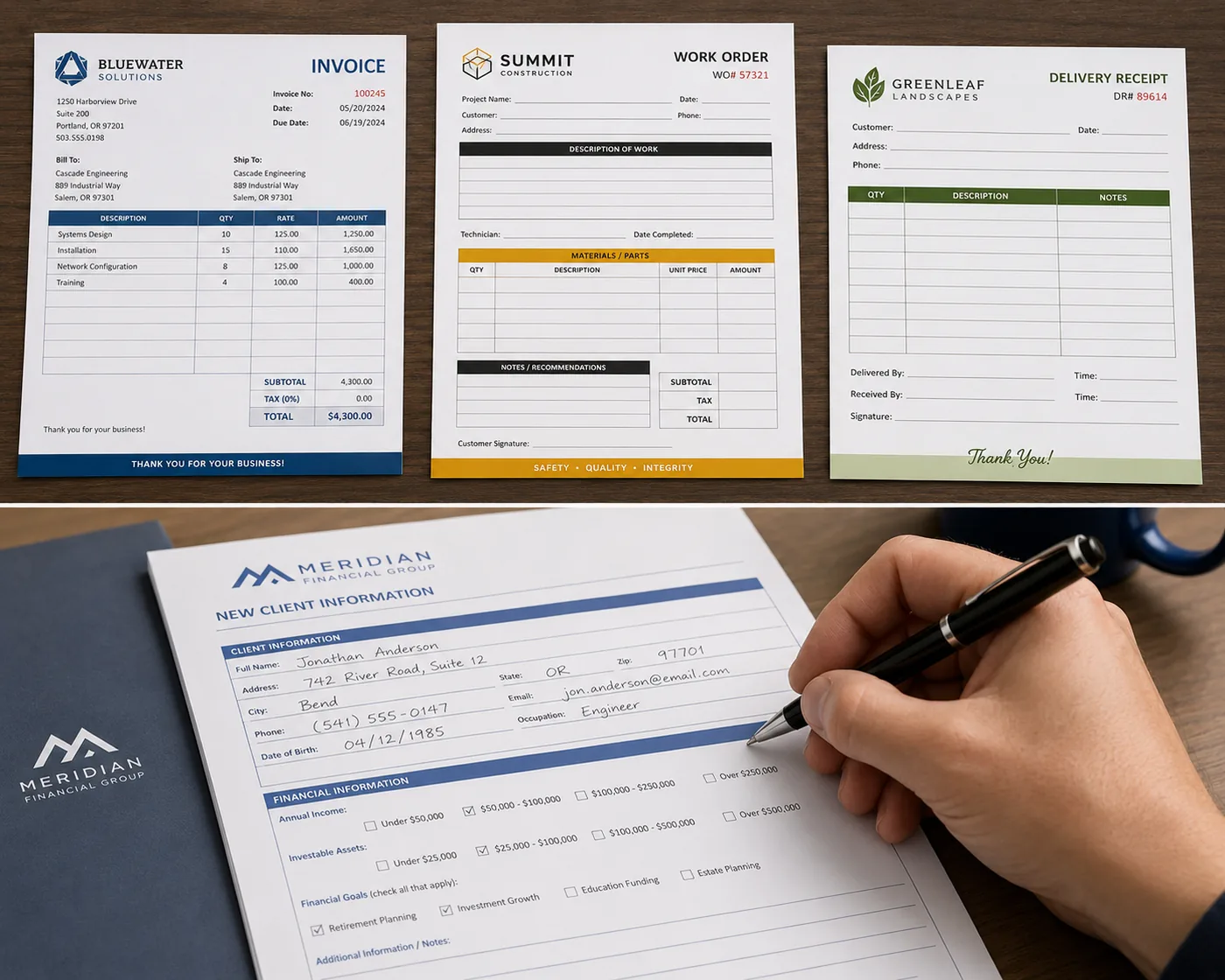
Why paper forms still exist
It is fashionable to assume every form should be digital, and for many, that is right. Several categories genuinely resist digitization, for reasons worth understanding before you try to eliminate them.
The signature has to happen where there is no device. A delivery confirmation at a dock, a service record in a crawlspace, an inspection in a facility where phones are not permitted. A form works everywhere.
Multiple parties need a copy immediately. This is the entire purpose of carbonless forms, and it is a genuinely elegant solution: one act of writing produces identical copies for the customer, the driver, and the office, instantly, with no synchronization, no connectivity, and no app.
The record has to survive. Paper stored properly lasts decades without migration, format obsolescence, or a subscription.
Regulation or a customer requires it. Sometimes the answer is that a specific document must exist physically, and that is the end of the analysis.
The useful question is not whether a form should be digital, but whether the moment it captures has a device, connectivity, and time. If any of the three is missing, paper is not a legacy choice; it is the working one.
NCR carbonless, specified properly
NCR stands for "no carbon required," and the mechanism is coated sheets that transfer an image under pressure. Writing on the top sheet produces the same marks on the sheets below.
We produce 2-part, 3-part, and 4-part sets. Choosing the part count is straightforward once you count the parties who need a copy at the moment of writing, not afterwards. If the office copy can be produced later from the customer copy, you may need fewer parts than you think.
Three specification points that matter and get missed:
Sets are glued into pads. A common gap between what a customer expects and what they ordered is the pad question: how many sets per pad. Padding is a real finishing step, and if you need pads rather than loose sets, say so. Where a job needs pad glue, the pad count is derived from the total quantity rather than left ambiguous, which is the sort of detail that should be settled at quote rather than discovered at delivery.
Sequential numbering is usually wanted and rarely mentioned. If your forms need unique numbers, that is variable data, and it should be specified up front along with the starting number and whether each part in a set carries the same number.
Write only where writing happens. Ink coverage on the areas people write on can interfere with legibility on the lower copies. Keep the handwriting fields clean.
Labels, where the substrate decision dominates
Labels look like the simplest printed product and have the most failure modes, because a label is a chemistry problem as much as a printing one. The adhesive and the face stock have to survive the environment the label lives in, and the most common label failure is not a print defect but a label that came off.
Four questions that determine the specification:
- What surface does it stick to? Corrugated, glossy plastic, glass, metal, and textured surfaces each behave differently. A label that adheres beautifully to a carton can peel off a polybag.
- What temperature and humidity does it live in? Freezer, refrigerated, outdoor, or humid environments need adhesives selected for them. Ordinary adhesive fails in cold, sometimes immediately.
- Does it need to come off? Removable and permanent are different products. A label meant to be peeled off cleanly is a deliberate choice, not a weaker version of a permanent one.
- Is it scanned? Barcodes need adequate quiet zone, sufficient contrast, and a size the scanner can resolve. A barcode printed too small or too close to an edge is a label that works visually and fails operationally.
That last one deserves emphasis if your labels are used in a warehouse. Every pick is scanned, and barcode-verified picking means the scan checks the SKU against the order before it leaves the aisle. A label whose barcode does not scan reliably degrades that control, which is why it is worth getting the barcode specification right at design rather than discovering it at a pick face.
We also flag whether a barcode is present in artwork, which catches the omission case. Verifying that the code encodes the right digits stays with you, because we cannot know what the number should be.
Loose-leaf and binder content, the underrated option
Loose-leaf content is printed and drilled sheets that go into the user's own binder. It is not really a binding method, and for operational documentation it is frequently the correct answer for one reason: you can revise nine pages without reprinting the book.
For anything with a revision cycle, such as training material, policy manuals, price lists, and procedure documentation, this changes the economics fundamentally. A bound manual means every revision obsoletes the whole book. Loose-leaf turns a reprint into a page swap, which means you can keep documentation current instead of tolerating a document everyone knows is out of date because reprinting it is expensive.
Practical points: standard three-hole drilling is an in-house finishing operation with no meaningful lead time impact, tabs are available with several bank sizes and can be printed or plain, and building in a version indicator and date on every page is the small habit that makes a loose-leaf system maintainable.
The quantity logic here follows our note on print quantity as an inventory decision: separate the stable content from the volatile, print the stable deep and the volatile shallow.
Specifying operational print without a second round
Operational print is where under-specification costs the most, because the piece has to work rather than merely look right. A checklist:
-
Describe the job, not just the artifact
Who fills it in, where, with what, and what happens to each copy. This surfaces requirements that a dimensional spec never would.
-
State the environment
For labels especially: surface, temperature, moisture, handling, and expected life. This decides the substrate.
-
Name the numbering and variable fields
Sequential numbers, dates, locations, codes. Include the starting number and the rule.
-
Specify the finishing precisely
Pads or loose sets, sets per pad, drilling and hole pitch, perforation position, tabs and bank size.
-
Get a physical sample for anything functional
A digital proof cannot tell you whether the carbonless transfers legibly, whether the label sticks, or whether the perforation tears cleanly. Those are the things you need to know.
The bottom line
Operational print is judged on whether it works, not on how it looks, which makes specification the whole job. Count the parties who need a copy, state the environment a label lives in, name the numbering rule, and be precise about finishing.
And for anything with a revision cycle, consider loose-leaf before you bind. Being able to replace nine pages instead of a book is worth more than it sounds.
Related reading
Variable data printing in plain English
Sequential numbering, unique codes, and what your spreadsheet has to contain.
Read →Choosing a binding method
Where loose-leaf beats a bound book, and the page counts each method supports.
Read →Specify it once, correctly
Tell us what the form or label has to do, where it lives, and who handles it. We will recommend the substrate, part count, and finishing, and send a physical sample so you can confirm it works before the run.
Get a print quote